
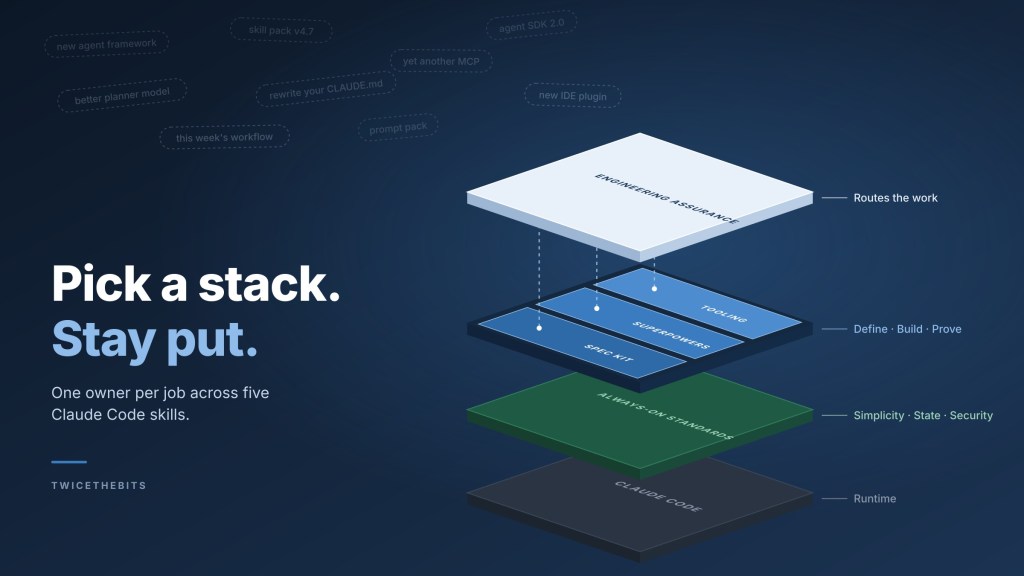
My social feeds are full of things to try. A new skill pack, a repo that promises a better agent workflow, someone’s CLAUDE.md that apparently changes everything. Most days I scroll past a dozen of them. Some days I give in and install a couple.
The trouble is what that does to my setup. Every install adds more skills and more instructions, and more things Claude might pick up when I didn’t ask it to. My Claude install gets cluttered, I lose track of what’s doing what, and keeping it all working starts to take more effort than the coding it was meant to help with. Underneath it sits a low-level anxiety that I’m missing the boat on something everyone else has already worked out.
Honestly, most of it is noise. If I hit a real problem, I’ll go looking and I’ll find the solution. I don’t need to pre-install every possible answer just in case.
So here’s my argument. When the tools move this fast, staying put is an advantage you can build on. The setup that has given me the best results is the one I’ve lived with longest: I know where it goes wrong, I’ve tuned it, and each fix stays fixed. Pick a sensible environment, learn it properly, and improve it in small steps. The hard part is making that environment coherent enough to live with.
Five good skills, one messy workflow
My Claude Code setup settled on five skills I actually trust:
- Spec Kit for requirements and plans
- Superpowers for TDD, debugging and agent orchestration
- Ponytail for keeping things simple
- Implicit State Check, my own skill for explicit state and predictable flows
- An OWASP security skill
Each one is good on its own. Put them together and they start stepping on each other. Spec Kit wants to write a spec. Superpowers wants to brainstorm and write a plan. Both want to run a review. Ponytail is telling everyone to write less while the security skill asks for a threat model.
On a one-line bug fix I’d end up with two planning documents and a subagent reviewing the diff. On a real feature I sometimes couldn’t tell you which skill had done what. That’s a bad place to be if the whole point is to iterate on a setup, because you can’t improve something you can’t see.
What I needed was a sixth skill that did less: one that decided who does which job.
What Engineering Assurance does
Engineering Assurance is a single SKILL.md. It’s opt-in (disable-model-invocation: true), so Claude never reaches for it on its own. I call it when the work matters and leave it alone when I’m just playing.
When I invoke it, it does a few things before touching any code. It checks which of the five skills are actually installed and reads their instructions instead of assuming. It gives each one a job. It picks an assurance level. Then it writes me a short summary: the approach, the checks it plans to run, any agents it wants to use, and anything risky or undecided.
After that it steps back and lets the owners do the work.
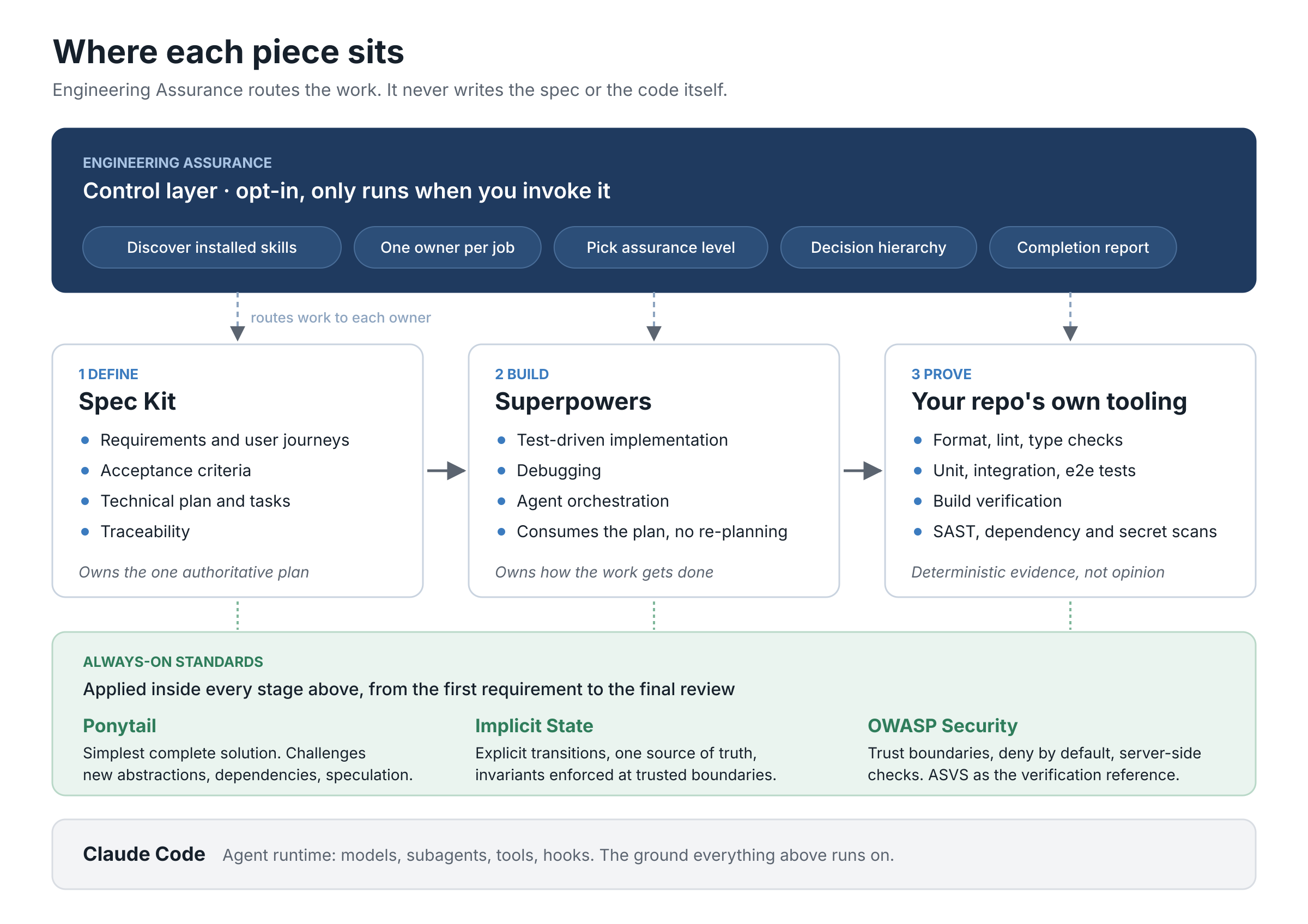
The picture below is the easiest way to explain it. Claude Code is the runtime at the bottom. The delivery path runs left to right: Spec Kit defines what to build, Superpowers builds it, and your repo’s own tooling (linters, type checks, tests, scanners) provides the evidence. Ponytail, Implicit State and OWASP don’t own a stage. They’re standards that apply inside every stage. Engineering Assurance sits on top as a control layer and never writes the spec or the code itself.
One owner per job
One rule removed most of the duplication: every activity has exactly one owner.
Spec Kit owns requirements, acceptance criteria and the plan. If a project already has a constitution or a spec, that’s authoritative and gets updated. No parallel specs.
Superpowers owns implementation, TDD, debugging and orchestration. It consumes the plan instead of brainstorming a new one.
Ponytail challenges every new module, dependency and abstraction. Implicit State contributes its principles (explicit transitions, one source of truth, invariants enforced at trusted boundaries) without kicking off its full refactoring review. OWASP gets applied from the first requirement, rather than saved for an audit at the end.
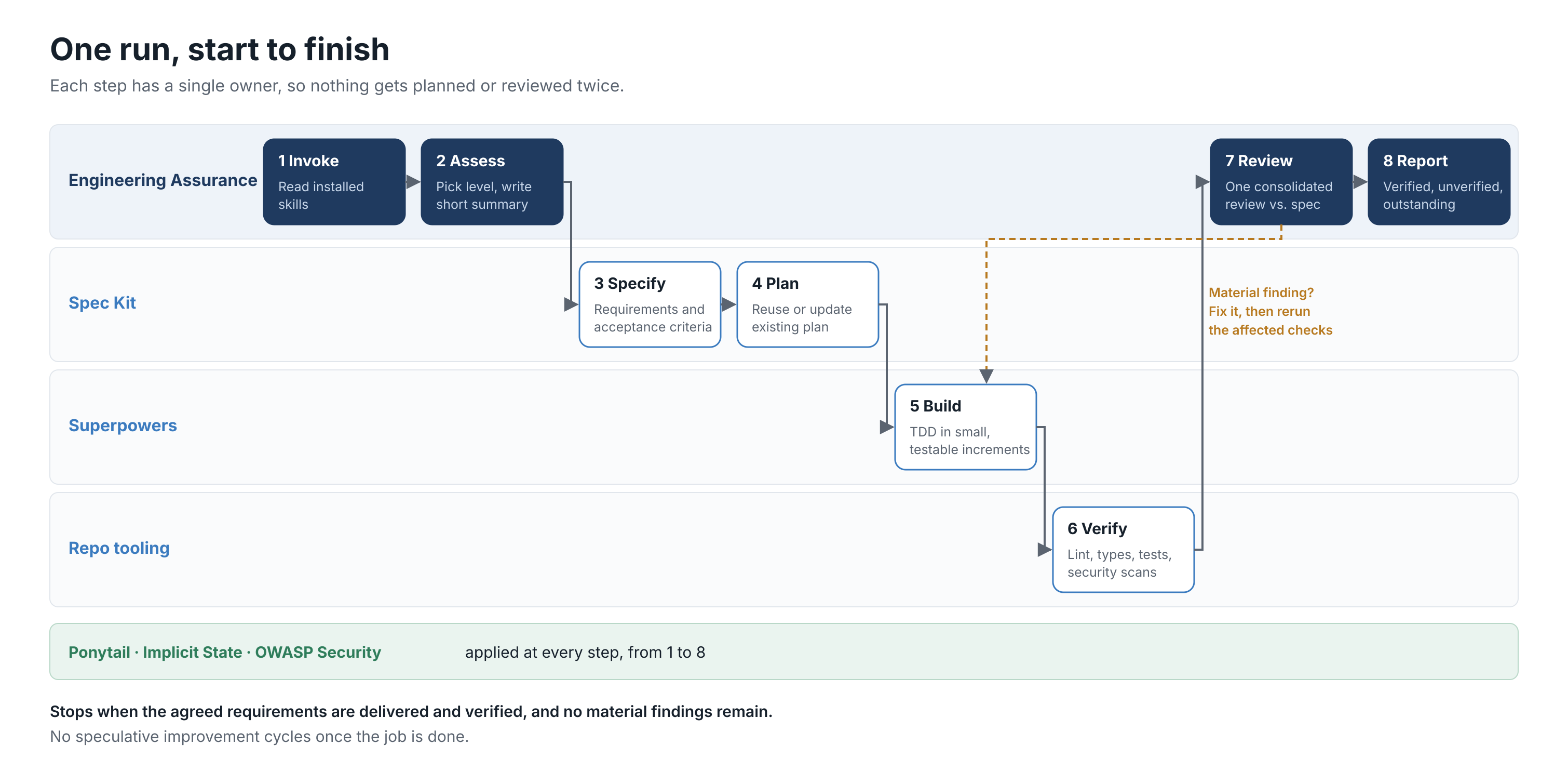
Here’s what a run looks like. If the final review finds something material, the work goes back to the build step, the affected checks rerun, and that’s it. The skill stops when the requirements are delivered and verified. It doesn’t keep inventing improvements just because there’s always another refactor available.
Match the effort to the risk
Running the full stack on a CSS tweak wastes tokens and patience, so the skill has three levels.
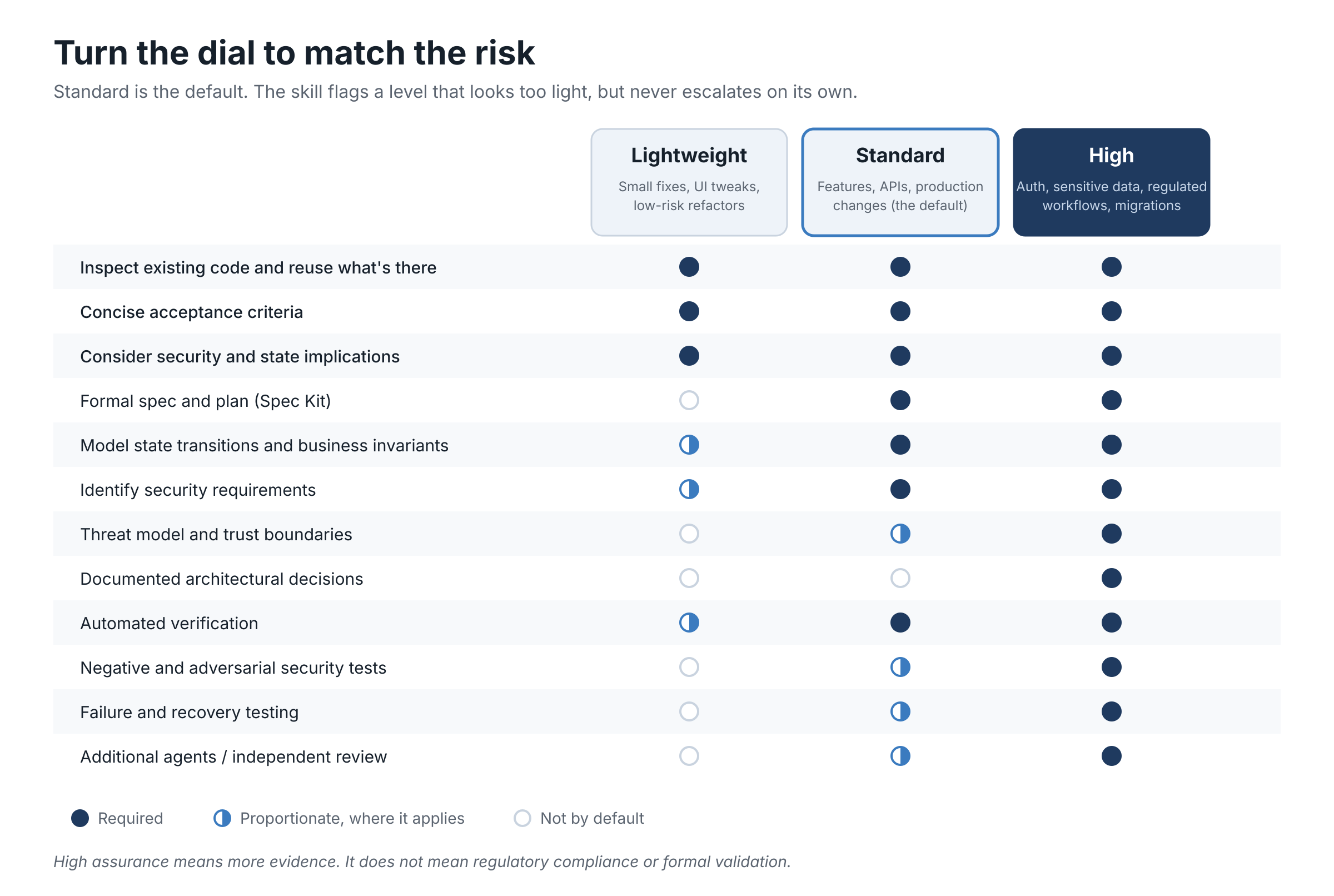
Lightweight is for small fixes: look at the existing code, agree a couple of acceptance criteria, make the smallest complete change, run targeted tests. No planning documents, no extra agents. Standard is the default for features and production changes. High is for authentication, sensitive data, regulated workflows and migrations, where I want a threat model, explicit lifecycle modelling, adversarial tests and an independent review.
If I ask for lightweight on something that touches auth, it tells me. It won’t quietly escalate into an expensive multi-agent run, though. That call stays with me.
I added one line because of my day job. High assurance means more evidence. It doesn’t mean the software is validated or compliant. I work in a regulated environment and didn’t want anyone (me included) reading more into the label than it delivers.
When the rules disagree
Skills sometimes give conflicting advice. Ponytail wants less code; the security skill wants another validation layer. So there’s a fixed order of priority:
- Security, privacy and data integrity
- Functional correctness and business invariants
- Agreed requirements and acceptance criteria
- Regulatory and architectural constraints
- Maintainability and user experience
- Simplicity
- Speed and token efficiency
Simplicity sits sixth on purpose. Shorter code that drops a server-side permission check is a bug, however tidy it looks.
Why this makes the setup easier to keep
Because each job has a named owner, I can replace one piece without rebuilding everything. If something better than Spec Kit turns up next month, I swap the planning owner and the rest of the workflow carries on as before.
The completion report helps too. Every run lists which skills were actually used, what duplicate work was skipped, what got verified and what didn’t. After a few weeks that tells me which parts are earning their place and which are along for the ride. (It won’t make up token counts when the environment doesn’t provide them, which I appreciate more than I expected to.)
That’s the loop I was after. One environment, small deliberate changes, and enough visibility to know whether a change helped.
Try it
Engineering Assurance is on GitHub: github.com/Pa8dy/engineering-assurance. Add it to your skills and invoke it by name, with a level if you want something other than standard.
The skills it coordinates:
- Spec Kit: github.com/github/spec-kit
- Superpowers: github.com/obra/superpowers
- Ponytail: github.com/DietrichGebert/ponytail
- Implicit State Check Code Review: github.com/Pa8dy/implicit-state-check-code-review
- OWASP Security: github.com/OWASP/www-project-agentic-skills-top-10
It works with whichever of these you have installed. Anything missing gets reported, and it carries on using the principles written into the skill itself. It won’t install anything for you.
Vibe code when you want. Invoke Engineering Assurance when quality matters.


Leave a Reply